Define Operating System?/ What is Operating system?
Operating System lies in the category of system software. It basically manages all the resources of the computer. An operating system acts as an interface between the software and different parts of the computer or the computer hardware.
It controls and monitors the execution of all other programs that reside in the computer, which also includes application programs and other system software of the computer.
Examples of operating system are Windows, Linux, Mac OS, etc.
What are the types of Operating System?
An Operating System performs all the basic tasks like managing files, processes, and memory. Thus operating system acts as the manager of all the resources, i.e. resource manager. Thus, the operating system becomes an interface between user and machine.
Batch Operating System
In this technique, similar types of jobs were batched together and executed in time. People were used to having a single computer which was called a mainframe.
In Batch operating system, access is given to more than one person; they submit their respective jobs to the system for the execution.
The system put all of the jobs in a queue on the basis of first come first serve and then executes the jobs one by one. The users collect their respective output when all the jobs get executed.
Multi programming Operating system
Multiprogramming is an extension to batch processing where the CPU is always kept busy. Each process needs two types of system time: CPU time and IO time.
In a multiprogramming environment, when a process does its I/O, The CPU can start the execution of other processes. Therefore, multiprogramming improves the efficiency of the system.
Multiprocessor Operating System
In Multiprocessing, Parallel computing is achieved. There are more than one processors present in the system which can execute more than one process at the same time. This will increase the throughput of the system.
Types of Multiprocessor Operating system:
1.Symmetrical Multiprocessing Operating System.
2.Asymmetrical Multiprocessing Operating System. Network Operating System
An Operating system, which includes software and associated protocols to communicate with other computers via a network conveniently and cost-effectively, is called Network Operating System.
Types of network operating System:
1.Client server operating system.
2.Peer to peer operating system. Time Sharing Operating System
In the Time Sharing operating system, computer resources are allocated in a time-dependent fashion to several programs simultaneously. Thus it helps to provide a large number of user's direct access to the main computer. It is a logical extension of multiprogramming. In time-sharing, the CPU is switched among multiple programs given by different users on a scheduled basis.
Distributed Operating System
The Distributed Operating system is not installed on a single machine, it is divided into parts, and these parts are loaded on different machines. A part of the distributed Operating system is installed on each machine to make their communication possible. Distributed Operating systems are much more complex, large, and sophisticated than Network operating systems because they also have to take care of varying networking protocols.
What is a System call in operating System?
A system call is a method for a computer program to request a service from the kernel of the operating system on which it is running. A system call is a method of interacting with the operating system via programs.
When the process is being run, if the process requires certain actions which need to be carried out by Operating System, the process has to go call the function which can interact with the kernel to complete the actions. This special type of function call is known as System Calls in OS.
Types of System Calls
There are mainly 5 types of system calls available:
Process Control.
File Management.
Device Management.
Information Maintenance.
Communication. Process Control
Process control is the system call that is used to direct the processes. Some process control examples include creating, load, abort, end, execute, process, terminate the process, etc.
File Management
File management is a system call that is used to handle the files. Some file management examples include creating files, delete files, open, close, read, write, etc.
Device Management
Device management is a system call that is used to deal with devices. Some examples of device management include read, device, write, get device attributes, release device, etc.
Information Maintenance
Information maintenance is a system call that is used to maintain information. There are some examples of information maintenance, including getting system data, set time or date, get time or date, set system data, etc.
Communication
Communication is a system call that is used for communication. There are some examples of communication, including create, delete communication connections, send, receive messages, etc.
Functions and Services of Operating system?
The Operating System provides a user-friendly environment for the creation and execution of programs and provides services to the user, There are Many Functions of OS Performed by the Operating System. The Main Functions and services are of OS are:
Program Creation
The operating system provides editors, debuggers to assist the programmer in creating programs.
Program Execution
Several tasks are required to execute a program, the tasks include instructions and data must be loaded into main memory, i/o devices and files must be initialized, and other resources must be prepared. The OS handles these tasks for the user.
Input/Output Operations
A running program may require input and output. This i/o may involve a file or an i/o device. A user program can’t execute i/o operations directly, The OS must provide some means to do so.
Error Detection
The operating system detects the different types of errors and should take appropriate action. The errors include memory errors, power failure, and printer out-of-paper.
Accounting
The operating system can keep track of which user uses how much time and what kind of computer resources used. This record-keeping is useful to improve computing services.
Protection
The operating system provides a security mechanism to protect from unauthorized usage of files in the network environment
Explain the structure of the Operating system?
Operating system can be implemented with the help of various structures. The structure of the OS depends mainly on how the various common components of the operating system are interconnected and melded into the kernel. Depending on this we have following structures of the operating system:
Simple structure
Such operating systems do not have well defined structure and are small, simple and limited systems. The interfaces and levels of functionality are not well separated. MS-DOS is an example of such operating system.
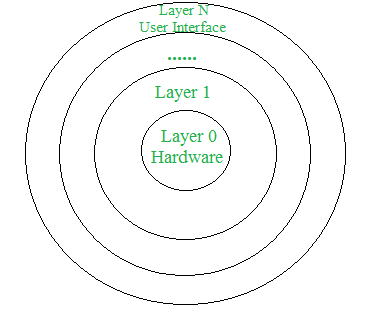
Image link: Click here Layered structure
An OS can be broken into pieces and retain much more control on system. In this structure the OS is broken into number of layers (levels). The bottom layer (layer 0) is the hardware and the topmost layer (layer N) is the user interface. These layers are so designed that each layer uses the functions of the lower level layers only. This simplifies the debugging process as if lower level layers are debugged and an error occurs during debugging then the error must be on that layer only as the lower level layers have already been debugged.
The main disadvantage of this structure is that at each layer, the data needs to be modified and passed on which adds overhead to the system.
UNIX is the Example of this structure.
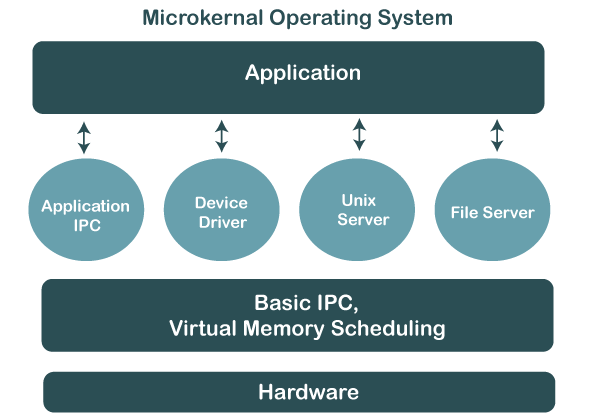
Image Link:Click here Micro Kernal Structure
This structure designs the operating system by removing all non-essential components from the kernel and implementing them as system and user programs. This result in a smaller kernel called the micro-kernel.
Advantages of this structure are that all new services need to be added to user space and does not require the kernel to be modified. Thus it is more secure and reliable as if a service fails then rest of the operating system remains untouched. Mac OS is an example of this type of OS.
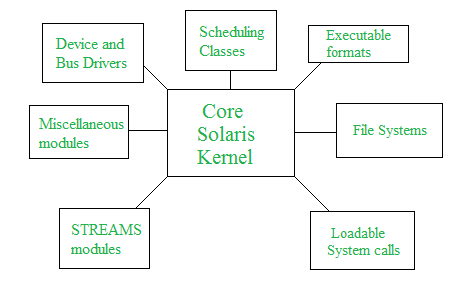
Image Link: Click here Modular Structure
It is considered as the best approach for an OS. It involves designing of a modular kernel. The kernel has only set of core components and other services are added as dynamically loadable modules to the kernel either during run time or boot time. It resembles layered structure due to the fact that each kernel has defined and protected interfaces but it is more flexible than the layered structure as a module can call any other module.
Image Link: Click here
What are the file attributes in Operating System? What is a file
A file can be defined as a data structure which stores the sequence of records. Files are stored in a file system, which may exist on a disk or in the main memory. Files can be simple (plain text) or complex (specially-formatted).
The collection of files is known as Directory. The collection of directories at the different levels, is known as File System.
Name
Every file carries a name by which the file is recognized in the file system. One directory cannot have two files with the same name.
Identifier
Along with the name, Each File has its own extension which identifies the type of the file. For example, a text file has the extension .txt, A video file can have the extension .mp4.
Type
In a File System, the Files are classified in different types such as video files, audio files, text files, executable files, etc.
Location
In the File System, there are several locations on which, the files can be stored. Each file carries its location as its attribute.
Size
The Size of the File is one of its most important attribute. By size of the file, we mean the number of bytes acquired by the file in the memory.
Protection
The Admin of the computer may want the different protections for the different files. Therefore each file carries its own set of permissions to the different group of Users
Time-Date
Every file carries a time stamp which contains the time and date on which the file is last modified.
Explain about Deadlock occurence and How to handle deadlock?
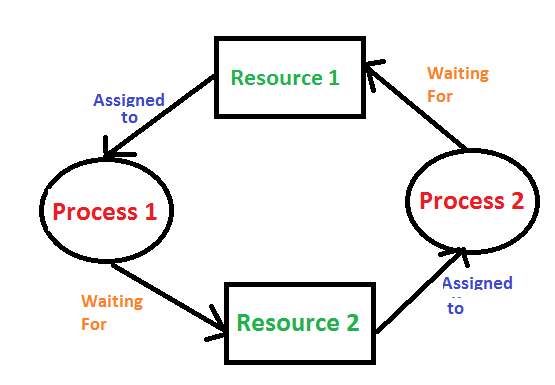
A deadlock is a situation where a set of processes are blocked because each process is holding a resource and waiting for another resource acquired by some other process.
Consider an example when two trains are coming toward each other on the same track and there is only one track, none of the trains can move once they are in front of each other. A similar situation occurs in operating systems when there are two or more processes that hold some resources and wait for resources held by other(s).
Image Link: Click here Methods For Handling Deadlock
There are four ways to Handle a deadlock in operating system
They are:
1. Deadlock Ignorance
2. Deadlock Prevention
3. Deadlock avoidance
4. Deadlock Detection and recovery Deadlock Ignorance
Deadlock Ignorance is the most widely used approach among all the mechanism. This is being used by many operating systems mainly for end user uses. In this approach, the Operating system assumes that deadlock never occurs. It simply ignores deadlock.
This approach is best suitable for a single end user system where User uses the system only for browsing and all other normal stuff.
Deadlock Prevention
Deadlock happens only when Mutual Exclusion, hold and wait, No preemption and circular wait holds simultaneously. If it is possible to violate one of the four conditions at any time then the deadlock can never occur in the system.
The idea behind the approach is very simple that we have to fail one of the four conditions but there can be a big argument on its physical implementation in the system.
Deadlock avoidance
In deadlock avoidance, the operating system checks whether the system is in safe state or in unsafe state at every step which the operating system performs. The process continues until the system is in safe state. Once the system moves to unsafe state, the OS has to backtrack one step.
In simple words, The OS reviews each allocation so that the allocation doesn't cause the deadlock in the system.
Deadlock Detection and recovery
This approach let the processes fall in deadlock and then periodically check whether deadlock occur in the system or not. If it occurs then it applies some of the recovery methods to the system to get rid of deadlock.
Discuss about Bankers algorithm in detail?
The banker's algorithm is a resource allocation and deadlock avoidance algorithm that tests for safety by simulating the allocation for the predetermined maximum possible amounts of all resources, then makes an “s-state” check to test for possible activities, before deciding whether allocation should be allowed to continue.
Why it is named as bankers algorithm?
Banker's algorithm is named so because it is used in the banking system to check whether a loan can be sanctioned to a person or not. Suppose there are n number of account holders in a bank and the total sum of their money is S. If a person applies for a loan then the bank first subtracts the loan amount from the total money that the bank has and if the remaining amount is greater than S then only the loan is sanctioned. It is done because if all the account holders come to withdraw their money then the bank can easily do it.
Advantages Of bankers algorithm
It contains various resources that meet the requirements of each process.
Each process should provide information to the operating system for upcoming resource requests, the number of resources, and how long the resources will be held.
It helps the operating system manage and control process requests for each type of resource in the computer system.
The algorithm has a Max resource attribute that represents indicates each process can hold the maximum number of resources in a system.
Disadvantage of bankers algorithm
It requires a fixed number of processes, and no additional processes can be started in the system while executing the process.
The algorithm does no longer allows the processes to exchange its maximum needs while processing its tasks.
Each process has to know and state their maximum resource requirement in advance for the system.
The number of resource requests can be granted in a finite time, but the time limit for allocating the resources is one year.
When working with a banker's algorithm, it requests to know about three things:
How much each process can request for each resource in the system. It is denoted by the [MAX] request.
How much each process is currently holding each resource in a system. It is denoted by the [ALLOCATED] resource.
It represents the number of each resource currently available in the system. It is denoted by the [AVAILABLE] resource.
Discuss about sheduling algorithms?
A CPU scheduling algorithm is used to determine which process will use CPU for execution and which processes to hold or remove from execution. The main goal or objective of CPU scheduling algorithms in OS is to make sure that the CPU is never in an idle state, meaning that the OS has at least one of the processes ready for execution among the available processes in the ready queue
Types of sheduling algorithms
Preemptive Scheduling Algorithms
In these algorithms, processes are assigned with priority. Whenever a high-priority process comes in, the lower-priority process which has occupied the CPU is preempted. That is, it releases the CPU, and the high-priority process takes the CPU for its execution.
Non-Preemptive Scheduling Algorithms
In these algorithms, we cannot preempt the process. That is, once a process is running on CPU, it will release it either by context switching or terminating. Often, these are the types of algorithms that can be used because of the limitation of the hardware.
here are some important terminologies to know for understanding the scheduling algorithms:
Arrival Time: This is the time at which a process arrives in the ready queue.
Completion Time: This is the time at which a process completes its execution.
Burst Time: This is the time required by a process for CPU execution.
Turn-Around Time: This is the difference in time between completion time and arrival time. This can be calculated as:
Turn Around Time = Completion Time – Arrival Time.
Waiting Time: This is the difference in time between turnaround time and burst time. This can be calculated as:
Waiting Time = Turn Around Time – Burst Time.
Throughput: It is the number of processes that are completing their execution per unit of time.
The Purpose of a Scheduling algorithm
Maximum CPU utilization
Fare allocation of CPU
Maximum throughput
Minimum turnaround time
Minimum waiting time
Minimum response time
What are the sheduling algorithms? First come first serve algorithm
It is the simplest algorithm to implement. The process with the minimal arrival time will get the CPU first. The lesser the arrival time, the sooner will the process gets the CPU. It is the non-preemptive type of scheduling.
It is a non-preemptive scheduling algorithm as the priority of processes does not matter, and they are executed in the manner they arrive in front of the CPU. This scheduling algorithm is implemented with a FIFO(First In First Out) queue.
Shortest Job First algorithm
The job with the shortest burst time will get the CPU first. The lesser the burst time, the sooner will the process get the CPU. It is the non-preemptive type of scheduling.
In this scheduling algorithm, the arrival time of the processes must be the same, and the processor must be aware of the burst time of all the processes in advance. If two processes have the same burst time, then First Come First Serve (FCFS) scheduling is used to break the tie.
Round Robin algorithm
In the Round Robin scheduling algorithm, the OS defines a time quantum (slice). All the processes will get executed in the cyclic way. Each of the process will get the CPU for a small amount of time (called time quantum) and then get back to the ready queue to wait for its next turn. It is a preemptive type of scheduling.
In this scheduling algorithm, processes are executed cyclically, and each process is allocated a small amount of time called time slice or time quantum. The ready queue of the processes is implemented using the circular queue technique in which the CPU is allocated to each process for the given time quantum and then added back to the ready queue to wait for its next turn.
Shortest remaining time algorithm
It is the preemptive form of SJF. In this algorithm, the OS schedules the Job according to the remaining time of the execution.
In this scheduling technique, the process with the shortest burst time is executed first by the CPU, but the arrival time of all processes need not be the same. If another process with the shortest burst time arrives, then the current process will be preempted, and a newer ready job will be executed first.
Pripority based Sheduling algorithm
In this algorithm, the priority will be assigned to each of the processes. The higher the priority, the sooner will the process get the CPU. If the priority of the two processes is same then they will be scheduled according to their arrival time
What are the file access methods?
A file is a collection of bits/bytes or lines which is stored on secondary storage devices like a hard drive (magnetic disks).
File access methods in OS are nothing but techniques to read data from the system's memory. There are various ways in which we can access the files from the memory like:
Sequential Access
Direct/Relative Access, and
Indexed Sequential Access.
Sequential access
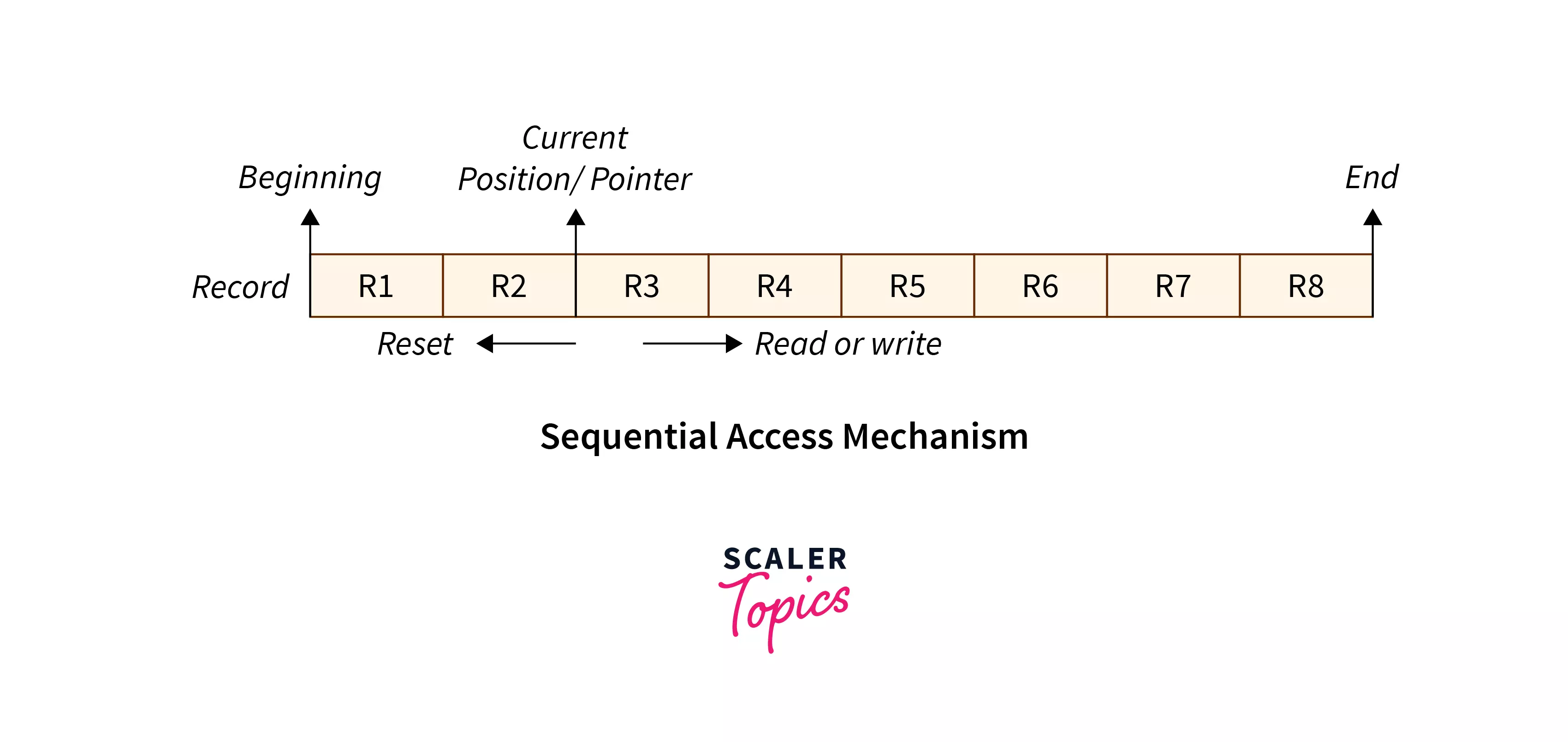
The operating system reads the file word by word in sequential access method of file accessing. A pointer is made, which first links to the file's base address.
If the user wishes to read the first word of the file, the pointer gives it to them and raises its value to the next word. This procedure continues till the file is finished. It is the most basic way of file access.
Example ImageDirect access
A Direct/Relative file access mechanism is mostly required with the database systems. In the majority of the circumstances, we require filtered/specific data from the database, and in such circumstances, sequential access might be highly inefficient.
Assume that each block of storage holds four records and that the record we want to access is stored in the tenth block. In such a situation, sequential access will not be used since it will have to traverse all of the blocks to get to the required record, while direct access will allow us to access the required record instantly.
Example ImageIndexed Sequential access
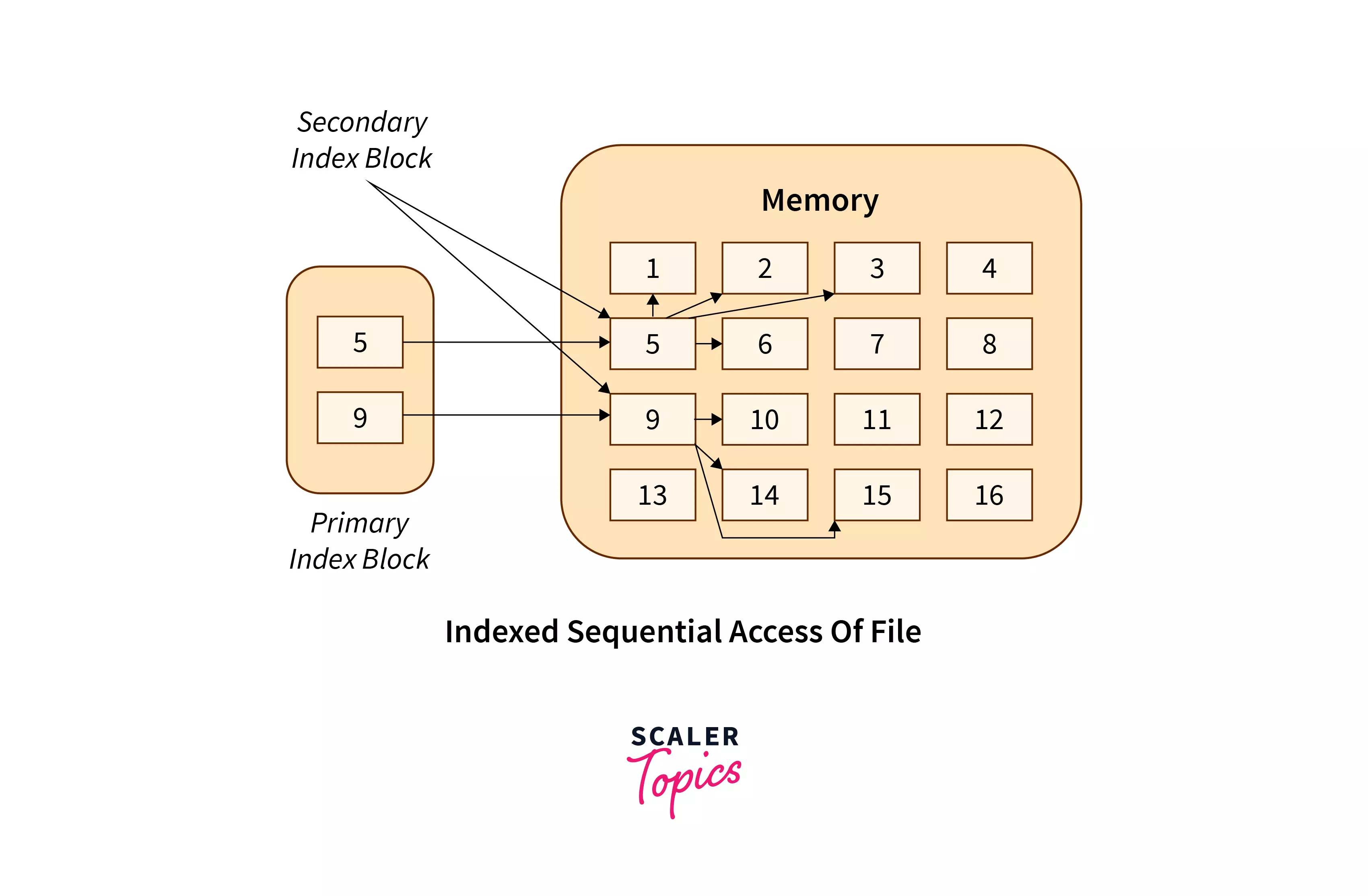
This method is practically similar to the pointer to pointer concept in which we store an address of a pointer variable containing address of some other variable/record in another pointer variable. The indexes, similar to a book's index (pointers), contain a link to various blocks present in the memory.
To locate a record in the file, we first search the indexes and then use the pointer to pointer concept to navigate to the required file.
Example Image
Discuss about free space management?
There is a system software in an operating system that manipulates and keeps a track of free spaces to allocate and de-allocate memory blocks to files, this system is called a file management system in an operating system". There is a free space list in an operating system that maintains the record of free blocks.
The process of looking after and managing the free blocks of the disk is called free space management. There are some methods or techniques to implement a free space list. These are as follows:
⚫Bitmap
⚫Linked list
⚫Grouping
⚫Counting
Bitmap
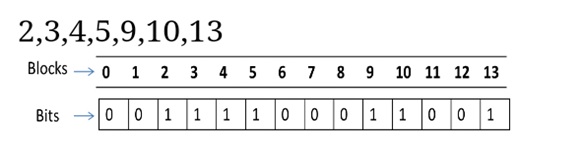
This technique is used to implement the free space management. When the free space is implemented as the bitmap or bit vector then each block of the disk is represented by a bit. When the block is free its bit is set to 1 and when the block is allocated the bit is set to 0. The main advantage of the bitmap is it is relatively simple and efficient.
Apple Macintosh operating system uses the bitmap method to allocate the disk space.
Assume the "2,3,4,5,9,10,13" are free. Rest are allocated: Image Linked List
This is another technique for free space management. In this linked list of all the free block is maintained.
In this, there is a head pointer which points the first free block of the list which is kept in a special location on the disk. This block contains the pointer to the next block and the next block contain the pointer of another next and this process is repeated. By using this disk it is not easy to search the free list. This technique is not sufficient to traverse the list because we have to read each disk block that requires I/O time. So traversing in the free list is not a frequent action.
Example:Click here Grouping
The grouping technique is also called the "modification of a linked list technique". In this method, first, the free block of memory contains the addresses of the n-free blocks. And the last free block of these n free blocks contains the addresses of the next n free block of memory and this keeps going on. This technique separates the empty and occupied blocks of space of memory.
Example:Click here Counting
In memory space, several files are created and deleted at the same time. For which memory blocks are allocated and de-allocated for the files. Creation of files occupy free blocks and deletion of file frees blocks. When there is an entry in the free space, it consists of two parameters- "address of first free disk block (a pointer)" and "a number 'n'".
Discuss about segmentation?
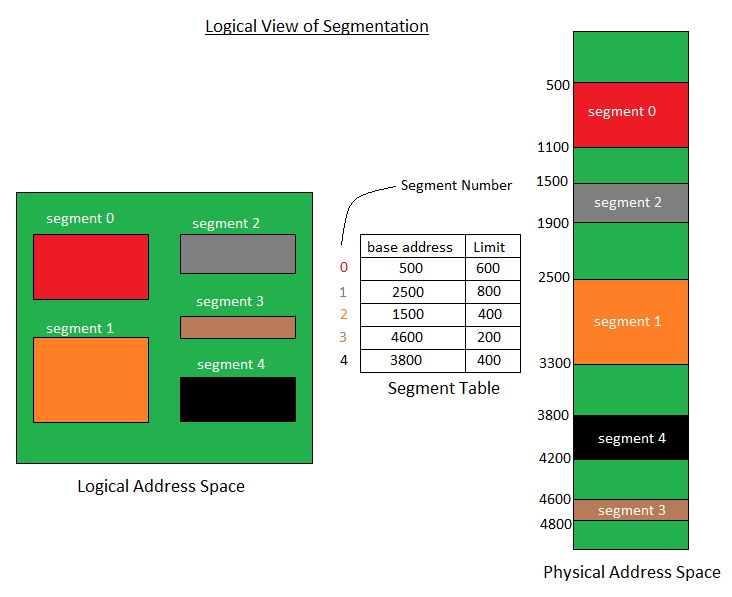
In Operating Systems, Segmentation is a memory management technique in which the memory is divided into the variable size parts. Each part is known as a segment which can be allocated to a process.
The details about each segment are stored in a table called a segment table. Segment table is stored in one (or many) of the segments.
There are types of segmentation:
Virtual memory segmentation-Each process is divided into a number of segments, not all of which are resident at any one point in time.
Simple segmentation-Each process is divided into a number of segments, all of which are loaded into memory at run time, though not necessarily contiguously.
There is no simple relationship between logical addresses and physical addresses in segmentation. A table stores the information about all such segments and is called Segment Table.
Segment Table: maps two-dimensional Logical address into one-dimensional Physical address. It’s each table entry has:
Base Address: It contains the starting physical address where the segments reside in memory.
Limit: It specifies the length of the segment.
Logical view of segmentation: Click here Advantages of Segmentation
No internal fragmentation
Average Segment Size is larger than the actual page size.
Less overhead
Disadvantages of Segmentation
It can have external fragmentation.
It is difficult to allocate contiguous memory to variable sized partition.
Costly memory management algorithms.
What is demand paging?
According to the concept of Virtual Memory, in order to execute some process, only a part of the process needs to be present in the main memory which means that only a few pages will only be present in the main memory at any time.
However, deciding, which pages need to be kept in the main memory and which need to be kept in the secondary memory, is going to be difficult because we cannot say in advance that a process will require a particular page at particular time.
Therefore, to overcome this problem, there is a concept called Demand Paging is introduced. It suggests keeping all pages of the frames in the secondary memory until they are required. In other words, it says that do not load any page in the main memory until it is required.
Whenever any page is referred for the first time in the main memory, then that page will be found in the secondary memory.
Demand Paging is a technique in which a page is usually brought into the main memory only when it is needed or demanded by the CPU. Initially, only those pages are loaded that are required by the process immediately. Those pages that are never accessed are thus never loaded into the physical memory.
Example Image
What are the page replacement algoroithm?
In an operating system that uses paging for memory management, a page replacement algorithm is needed to decide which page needs to be replaced when a new page comes in.
A page fault happens when a running program accesses a memory page that is mapped into the virtual address space but not loaded in physical memory. Since actual physical memory is much smaller than virtual memory, page faults happen.
First in First out algorithm(FIFO):
This is the simplest page replacement algorithm. In this algorithm, the operating system keeps track of all pages in the memory in a queue, the oldest page is in the front of the queue. When a page needs to be replaced page in the front of the queue is selected for removal.
Optimal Page replacement
Optimal page replacement is the best page replacement algorithm as this algorithm results in the least number of page faults. In this algorithm, the pages are replaced with the ones that will not be used for the longest duration of time in the future. In simple terms, the pages that will be referred farthest in the future are replaced in this algorithm
Least recently used page replacement
The least recently used page replacement algorithm keeps the track of usage of pages over a period of time. This algorithm works on the basis of the principle of locality of a reference which states that a program has a tendency to access the same set of memory locations repetitively over a short period of time. So pages that have been used heavily in the past are most likely to be used heavily in the future also.
In this algorithm, when a page fault occurs, then the page that has not been used for the longest duration of time is replaced by the newly requested page.
What are the disk sheduling algorithms?
As we know, a process needs two type of time, CPU time and IO time. For I/O, it requests the Operating system to access the disk.
However, the operating system must be fare enough to satisfy each request and at the same time, operating system must maintain the efficiency and speed of process execution.
The technique that operating system uses to determine the request which is to be satisfied next is called disk scheduling.
Some concept about Disk:
Seek Time
Seek time is the time taken in locating the disk arm to a specified track where the read/write request will be satisfied.
Rotational Latency
It is the time taken by the desired sector to rotate itself to the position from where it can access the R/W heads.
Transfer Time
It is the time taken to transfer the data.
Disk Access Time
Disk access time is given as,
Disk Access Time = Rotational Latency + Seek Time + Transfer Time
Disk Response Time
It is the average of time spent by each request waiting for the IO operation.
Let us discuss them:
First come First Serve:
It stands for 'first-come-first-serve'. As the name suggests, the request which comes first will be processed first and so on. The requests coming to the disk are arranged in a proper sequence as they arrive. Since every request is processed in this algorithm, so there is no chance of 'starvation'.
Shortest Seek time first:
It stands for 'Shortest seek time first'. As the name suggests, it searches for the request having the least 'seek time' and executes them first. This algorithm has less 'seek time' as compared to FCFS Algorithm.
Scan Sheduling
In this algorithm, the head starts to scan all the requests in a direction and reaches the end of the disk. After that, it reverses its direction and starts to scan again the requests in its path and serves them. Due to this feature, this algorithm is also known as the "Elevator Algorithm".
C-Scan sheduling
It stands for "Circular-Scan". This algorithm is almost the same as the Scan disk algorithm but one thing that makes it different is that 'after reaching the one end and reversing the head direction, it starts to come back. The disk arm moves toward the end of the disk and serves the requests coming into its path. After reaching the end of the disk it reverses its direction and again starts to move to the other end of the disk but while going back it does not serve any requests.
Look sheduling
In this algorithm, the disk arm moves to the 'last request' present and services them. After reaching the last requests, it reverses its direction and again comes back to the starting point. It does not go to the end of the disk, in spite, it goes to the end of requests.
C-Look Sheduling
The C-Look algorithm is almost the same as the Look algorithm. The only difference is that after reaching the end requests, it reverses the direction of the head and starts moving to the initial position. But in moving back, it does not serve any requests.
What is Access matrix?
Access Matrix is a security model of protection state in computer system. It is represented as a matrix. Access matrix is used to define the rights of each process executing in the domain with respect to each object. The rows of matrix represent domains and columns represent objects. Each cell of matrix represents set of access rights which are given to the processes of domain means each entry(i, j) defines the set of operations that a process executing in domain Di can invoke on object Oj.
As already discussed, the access matrix in the operating system likely occupies a significant amount of memory and is very sparse.
The access matrix can be subdivided into rows or columns to reduce the inefficiency. To increase efficiency, the columns, and rows can be collapsed by deleting null values.
Four widely used access matrix implementations can be formed using these decomposition methods:
Global Table
The global table is the most basic and simple implementation of the access matrix in the operating system which consists of a set of an ordered triple domain , object, right-set. When an operation M is being executed on an object Oj within domain Di, the global table searches for a triple Domain(Di), Object(Oj), right-set(Rk) where M € Rk. If the triple is present, the operation can proceed to continue, or else a condition of an exception is thrown.
Access List
In the Access Lists method, the access matrix in os is divided into columns (Column wise decomposition). When an operation M is being executed on an object Oj within domain Di, We search for an entry Domain(Di), right-set(Rk) with M € Rk in the access list for object Oj.If the triple is present, the operation can proceed to continue, or else we check the initial set. If M is included in the default set, access is allowed; otherwise, access is denied, and an exception is raised.
Capability List
In the access matrix in the operating system, Capability Lists is a collection of objects and the operations that can be performed on them. The object here is specified by a physical name called capability. In this method, we can associate each row with its domain instead of connecting the columns of the access matrix to the objects as an access list.
It is a comparison between capability lists and access lists. Every domain has a distinct bit pattern called keys, and every object has a distinct bit pattern called locks. Only if a domain's key matches one of the locks of the object, A process can access it.
In simple words, When a process running in a specific domain (Di) try to access an object (Oj) then the key of that Di must match with the lock of that Oj, then only an object can be accessed.
What are the sheduling algorithm criteria?
Scheduling is a process of allowing one process to use the CPU resources, keeping on hold the execution of another process due to the unavailability of resources CPU.
The aim of the scheduling algorithm is to maximize and minimize the following:
Maximize:
CPU utilization - It makes sure that the CPU is operating at its peak and is busy.
Throughoutput - It is the number of processes that complete their execution per unit of time.
Minimize:
Waiting time- It is the amount of waiting time in the queue.
Response time- Time retired for generating the first request after submission.
Turnaround time- It is the amount of time required to execute a specific process.
There are many criteria suggested for comparing CPU schedule algorithms, some of which are:
CPU Utilization
The object of any CPU scheduling algorithm is to keep the CPU busy if possible and to maximize its usage. In theory, the range of CPU utilization is in the range of 0 to 100 but in real-time, it is actually 50 to 90% which relies on the system's load.
Throughput
It is a measure of the work that is done by the CPU which is directly proportional to the number of processes being executed and completed per unit of time. It keeps on varying which relies on the duration or length of processes.
Turn-Around time
A turnaround time is the elapsed from the time of submission to that of completion.
TurnAroundTime=Compilationtime-Arrivaltime.
Waiting Time
Once the execution starts, the scheduling process does not hinder the time that is required for the completion of the process. The only thing that is affected is the waiting time of the process, i.e the time that is spent by a process waiting in a queue. Once the execution starts, the scheduling process does not hinder the time that is required for the completion of the process. The only thing that is affected is the waiting time of the process, i.e the time that is spent by a process waiting in a queue.
Response Time
It is amount of time to response to a request by a process.
Define paging in operating system?
In Operating Systems, Paging is a storage mechanism used to retrieve processes from the secondary storage into the main memory in the form of pages.
The main idea behind the paging is to divide each process in the form of pages. The main memory will also be divided in the form of frames.
One page of the process is to be stored in one of the frames of the memory. The pages can be stored at the different locations of the memory but the priority is always to find the contiguous frames or holes.
Pages of the process are brought into the main memory only when they are required otherwise they reside in the secondary storage.
Let us look some important terminologies:
Logical Address or Virtual Address (represented in bits): An address generated by the CPU
Logical Address Space or Virtual Address Space( represented in words or bytes): The set of all logical addresses generated by a program
Physical Address (represented in bits): An address actually available on memory unit
Physical Address Space (represented in words or bytes): The set of all physical addresses corresponding to the logical addresses
Features of paging:
Mapping logical address to physical address.
Page size is equal to frame size.
Number of entries in a page table is equal to number of pages in logical address space.
The page table entry contains the frame number.
All the page table of the processes are placed in main memory
Write about protection in operating system?
Protection is especially important in a multiuser environment when multiple users use computer resources such as CPU, memory, etc. It is the operating system's responsibility to offer a mechanism that protects each process from other processes.
In a multiuser environment, all assets that require protection are classified as objects, and those that wish to access these objects are referred to as subjects. The operating system grants different 'access rights' to different subjects.
A mechanism that controls the access of programs, processes, or users to the resources defined by a computer system is referred to as protection.
Need For protection
Various needs of protection in the operating system are as follows:
1.There may be security risks like unauthorized reading, writing, modification, or preventing the system from working effectively for authorized users.
2.It helps to ensure data security, process security, and program security against unauthorized user access or program access.
3.It is important to ensure no access rights' breaches, no viruses, no unauthorized access to the existing data.
4.Its purpose is to ensure that only the systems' policies access programs, resources, and data.
Goals of Protection
The policies define how processes access the computer system's resources, such as the CPU, memory, software, and even the operating system. It is the responsibility of both the operating system designer and the app programmer. Although, these policies are modified at any time.
Protection is a technique for protecting data and processes from harmful or intentional infiltration. It contains protection policies either established by itself, set by management or imposed individually by programmers to ensure that their programs are protected to the greatest extent possible.
It also provides a multiprogramming OS with the security that its users expect when sharing common space such as files or directories.
Role of protection
Its main role is to provide a mechanism for implementing policies that define the use of resources in a computer system. Some rules are set during the system's design, while others are defined by system administrators to secure their files and programs.
Every program has distinct policies for using resources, and these policies may change over time. Therefore, system security is not the responsibility of the system's designer, and the programmer must also design the protection technique to protect their system against infiltration.
Domain Of protection
Various domains of protection in operating system are as follows:
The protection policies restrict each process's access to its resource handling. A process is obligated to use only the resources necessary to fulfil its task within the time constraints and in the mode in which it is required. It is a process's protected domain.
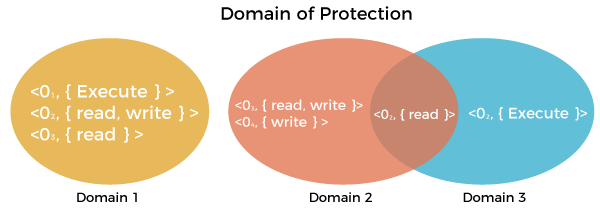
Processes and objects are abstract data types in a computer system, and these objects have operations that are unique to them. A domain component is defined as .
Each domain comprises a collection of objects and the operations that may be implemented on them. A domain could be made up of only one process, procedure, or user. If a domain is linked with a procedure, changing the domain would mean changing the procedure ID. Objects may share one or more common operations.
Domain of protectionImage
Write about security problems?
Protection mechanisms are the core of protection from accidents. The following list includes forms of accidental and malicious security violations. We should note that in our discussion of security, we vise the terms intruder and cracker for those attempting to breach security.
In addition, a threat is the potential for a security violation, stich as the discovery of a vulnerability, whereas an attack is the attempt to break secvirity.
1. Threat
A program that has the potential to harm the system seriously.
2. Attack
A breach of security that allows unauthorized access to a resource.
Security may be compromised through the breaches. Some of the breaches are as follows:
Breach of integrity:This violation has unauthorized data modification. When someone tries to modify your data without your concern.
Theft of service:It involves the unauthorized use of resources. Using someone else resource without their permission.
Breach of Confidentiality:It involves the unauthorized reading of data. Reading someone else data without their permission.
Breach of availability:It involves the unauthorized destruction of data.
Denial of Services:It includes preventing legitimate use of the system. Some attacks may be accidental.
Types of Threats
There are mainly two types of threats:
1. Program threats
2. Systme threats Program threats
Program Threats occur when a user program causes these processes to do malicious operations. The common example of a program threat is that when a program is installed on a computer, it could store and transfer user credentials to a hacker. There are various program threats.
Some of them are as follows:
Virus
A virus may replicate itself on the system. Viruses are extremely dangerous and can modify/delete user files as well as crash computers. A virus is a little piece of code that is implemented on the system program.
Trojan horse
This type of application captures user login credentials. It stores them to transfer them to a malicious user who can then log in to the computer and access system resources
Logic Bomb
A logic bomb is a situation in which software only misbehaves when particular criteria are met; otherwise, it functions normally.
Trap door
A trap door is when a program that is supposed to work as expected has a security weakness in its code that allows it to do illegal actions without the user's knowledge.
System Threats
System threats are described as the misuse of system services and network connections to cause user problems. These threats may be used to trigger the program threats over an entire network, known as program attacks.
There are various system threats. Some of them as follows:
Port Scanning
It is a method by which the cracker determines the system's vulnerabilities for an attack. It is a fully automated process that includes connecting to a specific port via TCP/IP. To protect the attacker's identity, port scanning attacks are launched through Zombie Systems, which previously independent systems now serve their owners while being utilized for such terrible purposes.
Worm
The worm is a process that can choke a system's performance by exhausting all system resources. A Worm process makes several clones, each consuming system resources and preventing all other processes from getting essential resources. Worm processes can even bring a network to a halt.
Denial of Service
Denial of service attacks usually prevents users from legitimately using the system. For example, if a denial-of-service attack is executed against the browser's content settings, a user may be unable to access the internet