logo

Question-Bank

  • Home
  • About_us

  • Define Computer Networks?
    A computer network is a system that connects numerous independent computers in order to share information (data) and resources. The integration of computers and other different devices allows users to communicate more easily.
    A computer network is a collection of two or more computer systems that are linked together.

  • What is an OSI Model?
    ⚫OSI stands for Open System Interconnection is a reference model that describes how information from a software application in one computer moves through a physical medium to the software application in another computer.
    ⚫OSI consists of seven layers, and each layer performs a particular network function.
    ⚫OSI model was developed by the International Organization for Standardization (ISO) in 1984, and it is now considered as an architectural model for the inter-computer communications.
    ⚫OSI model divides the whole task into seven smaller and manageable tasks. Each layer is assigned a particular task.
    ⚫Each layer is self-contained, so that task assigned to each layer can be performed independently
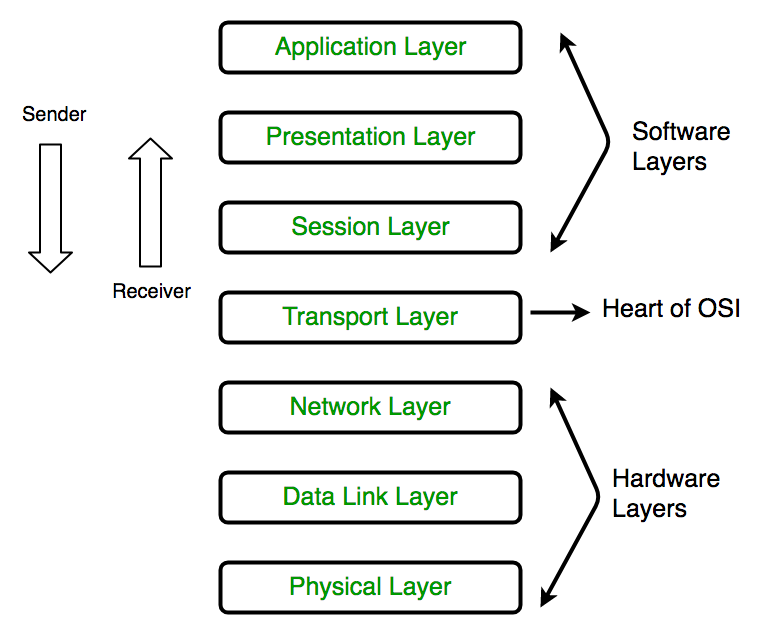
    There are the seven OSI layers. Each layer has different functions. A list of seven layers are given below:
    (i)Physical Layer
    (ii)Data-Link Layer
    (iii)Network Layer
    (iv)Transport Layer
    (v)Session Layer
    (vi)Presentation Layer
    (vii)Application Layer

  • Explain the 7 layers of OSI Model?
    The 7 Layers of OSI model are Image
    Physical Layer
    ⚫The main functionality of the physical layer is to transmit the individual bits from one node to another node.
    ⚫It is the lowest layer of the OSI model.
    ⚫It creates, maintains and deactivates the physical connection.
    Data-Link Layer
    ⚫This layer is responsible for the error-free transfer of data frames.
    ⚫It defines the format of the data on the network.
    ⚫It provides a reliable and efficient communication between two or more devices.
    ⚫It is mainly responsible for the unique identification of each device that resides on a local network.
    Network Layer
    ⚫It is a layer 3 that manages device addressing, tracks the location of devices on the network.
    ⚫It determines the best path to move data from source to the destination based on the network conditions, the priority of service, and other factors.
    ⚫The Data link layer is responsible for routing and forwarding the packets.
    Transport Layer
    ⚫The Transport layer is a Layer 4 ensures that messages are transmitted in the order in which they are sent and there is no duplication of data.
    ⚫The main responsibility of the transport layer is to transfer the data completely.
    ⚫It receives the data from the upper layer and converts them into smaller units known as segments.
    Session Layer
    ⚫It is a layer 3 in the OSI model.
    ⚫The Session layer is used to establish, maintain and synchronizes the interaction between communicating devices.
    ⚫Session layer adds some checkpoints when transmitting the data in a sequence. If some error occurs in the middle of the transmission of data, then the transmission will take place again from the checkpoint. This process is known as Synchronization and recovery.
    Presentation Layer
    ⚫It acts as a data translator for a network.
    ⚫This layer is a part of the operating system that converts the data from one presentation format to another format.
    ⚫The Presentation layer is also known as the syntax layer.
    Application Layer
    ⚫An application layer serves as a window for users to access network service.
    ⚫It handles issues such as network transparency, resource allocation, etc.
    ⚫An application layer is not an application, but it performs the application layer functions.
    ⚫This layer provides the network services to the end-users.

  • What are the Catergories of Network or What are the type of Networks?
    A computer network is a group of computers linked to each other that enables the computer to communicate with another computer and share their resources, data, and applications.
    A computer network can be categorized by their size. A computer network is mainly of four types:
    ⚫LAN(Local Area Network)
    ⚫PAN(Personal Area Network)
    ⚫MAN(Metropolitan Area Network)
    ⚫WAN(Wide Area Network)
    Let's Look them in detail now:-
    LAN(Local Area Network)
    Local Area Network is a group of computers connected to each other in a small area such as building, office.
    LAN is used for connecting two or more personal computers through a communication medium such as twisted pair, coaxial cable, etc.
    It is less costly as it is built with inexpensive hardware such as hubs, network adapters, and ethernet cables.
    The data is transferred at an extremely faster rate in Local Area Network.
    Local Area Network provides higher security.
    PAN(Personal Area Network)
    Personal Area Network is a network arranged within an individual person, typically within a range of 10 meters.
    Personal Area Network is used for connecting the computer devices of personal use is known as Personal Area Network.
    Personal Area Network covers an area of 30 feet.
    Personal computer devices that are used to develop the personal area network are the laptop, mobile phones, media player and play stations.
    There are two Types of PAN
    Wired personal area network : Wired personal area network is created by USB.
    Wireless personal area network: Wireless personal area network is created by wifi,radio etc.
    MAN(Metropolitan Area Network)
    A metropolitan area network is a network that covers a larger geographic area by interconnecting a different LAN to form a larger network.
    Government agencies use MAN to connect to the citizens and private industries.
    In MAN, various LANs are connected to each other through a telephone exchange line.
    It has a higher range than Local Area Network(LAN).
    WAN(Wide Area Network)
    A Wide Area Network is a network that extends over a large geographical area such as states or countries.
    A Wide Area Network is quite bigger network than the LAN.
    A Wide Area Network is not limited to a single location, but it spans over a large geographical area through a telephone line, fibre optic cable or satellite links.
    The internet is one of the biggest WAN in the world.
    A Wide Area Network is widely used in the field of Business, government, and education.

  • What is the criteria of Good Network?
    Performance:
    It can be measured in many ways, including transmit time and response time. Transit time is the amount of time required for a message to travel from one device to another. Response time is the elapsed time between an inquiry and a response. The performance of the network depends on a number of factors, including the number of users, the type of medium & hardware
    Reliability:
    In the addition to accuracy is measured by frequency of failure, the time it takes a link to recover from failure, and the network’s robustness in catastrophe.
    Security:
    Network security issues include protecting data from unauthorized access, protecting data from damage and development, and implementing policies and procedures for recovery from breaches and data loss.

  • What are the Goals of Networking?
    ⚫Programs do not have to execute on a single system because of resource and load sharing.
    ⚫Reduced costs - Multiple machines can share printers, tape drives, and other peripherals.
    ⚫Reliability - If one machine fails, another can take its place.
    ⚫Scalability (it's simple to add more processors or computers)
    ⚫Communication and mail (people living apart can work together)
    ⚫Information Access (remote information access, access to the internet, e-mail, video conferencing, and online shopping)
    ⚫Entertainment that is interactive (online games, videos, etc.)
    ⚫Social Networking

  • Define Data Communication System and Its Components?
    The term “Data Communication” comprises two words: Data and Communication. Data can be any text, image, audio, video, and multimedia files. Communication is an act of sending or receiving data. Thus, data communication refers to the exchange of data between two or more networked or connected devices.
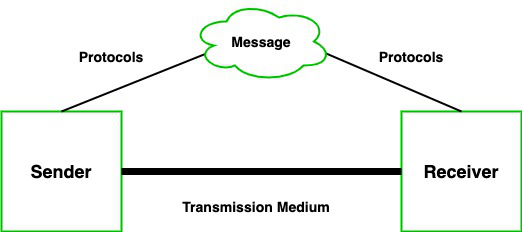
    Block Diagram of Data Communication
    A communication system is made up of the following components:
    Message:
    A message is a piece of information that is to be transmitted from one person to another. It could be a text file, an audio file, a video file, etc.
    Sender:
    It is simply a device that sends data messages. It can be a computer, mobile, telephone, laptop, video camera, or workstation, etc.
    Receiver:
    It is a device that receives messages. It can be a computer, telephone mobile, workstation, etc.
    Transmission Medium / Communication Channels:
    Communication channels are the medium that connect two or more workstations. Workstations can be connected by either wired media or wireless media.
    Set of rules (Protocol):
    When someone sends the data (The sender), it should be understandable to the receiver also otherwise it is meaningless.
    For example, Sonali sends a message to Chetan. If Sonali writes in Hindi and Chetan cannot understand Hindi, it is a meaningless conversation.
    A little about Set of rules which are followed by every computer:
    TCP(Transmission Control Protocal):
    It is responsible for dividing messages into packets on the sender computer and reassembling the packet at the receiver computer.
    In simple words it is designed to send packets across the internet and ensure the successful delivery of data and messages over networks.
    IP(Internet Protocal):
    IP is responsible for handling the address of the destination computer so that each packet is sent to its proper destination.
    Every device has an IP address that uniquely identifies it and enables it to communicate with and exchange data with other devices connected to the internet.
    Types Of Data communication
    As we know that data communication is communication in which we can send or receive data from one device to another. The data communication is divided into three types:
    Simplex Communication:
    It is one-way communication or we can say that unidirectional communication in which one device only receives and another device only sends data and devices uses their entire capacity in transmission. For example, IoT, entering data using a keyboard, listing music using a speaker, etc.
    Half Duplex communication:
    It is a two-way communication or we can say that it is a bidirectional communication in which both the devices can send and receive data but not at the same time. When one device is sending data then another device is only receiving and vice-versa. For example, walkie-talkie.
    Full-duplex communication:
    It is a two-way communication or we can say that it is a bidirectional communication in which both the devices can send and receive data at the same time. For example, mobile phones, landlines, etc.

  • What is a Transmission Media or Communication Channels?
    Communication channels are the medium that connects two or more workstations. Workstations can be connected by either wired media or wireless media. It is also known as a transmission medium.
    The transmission medium or channel is a link that carries messages between two or more devices. We can group the communication media into two categories:
    Guided media transmission
    In this transmission medium, the physical link is created using wires or cables between two or more computers or devices, and then the data is transmitted using these cables in terms of signals. Guided media transmission of the following types:
    1.Twisted Pair Cable
    2.Coaxial cable
    3.Optical Fibre
    Twisted pair Cable
    It is the most common form of wire used in communication. In a twisted-pair cable, two identical wires are wrapped together in a double helix. The twisting of the wire reduces the crosstalk.
    It is further divided into two types:
    Unshielded Twisted Pair (UTP):
    It is used in computers and telephones widely. As the name suggests, there is no external shielding so it does not protects from external interference. It is cheaper than STP.
    Shielded Twisted Pair (STP):
    It offers greater protection from crosstalk due to shield. Due to shielding, it protects from external interference. It is heavier and costlier as compare to UTP.
    Coaxial Cable:
    It consists of a solid wire core that is surrounded by one or more foil or wire shields. The inner core of the coaxial cable carries the signal and the outer shield provides the ground. It is widely used for television signals and also used by large corporations in building security systems. Data transmission of this cable is better but expensive as compared to twisted pair.
    Optical fibers:
    Optical fiber is an important technology. It transmits large amounts of data at very high speeds due to which it is widely used in internet cables. It carries data as a light that travels inside a thin glass fiber.
    Unguided media transmission
    The unguided transmission media is a transmission mode in which the signals are propagated from one device to another device wirelessly. Signals can wave through the air, water, or vacuum.
    Microwave:
    Microwave offers communication without the use of cables. Microwave signals are just like radio and television signals. It is used in long-distance communication.
    Radio Waves:
    When communication is carried out by radio frequencies, then it is termed radio waves transmission. It offers mobility. It is consists of the transmitter and the receiver. Both use antennas to radiate and capture the radio signal.
    Infrared:
    It is short-distance communication and can pass through any object. It is generally used in TV remotes, wireless mouse, etc.

  • Define Network Topology and its types?
    Topology defines the structure of the network of how all the components are interconnected to each other. There are two types of topology: physical and logical topology.

    There are 6 types of topology they are:-
    Bus Topology
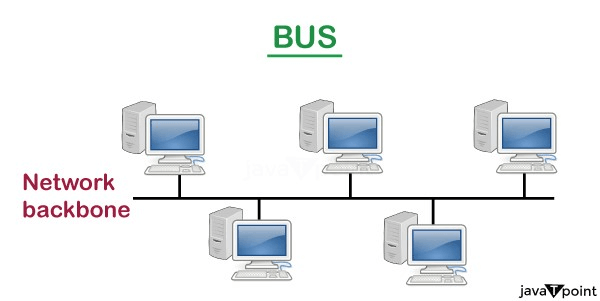
    The bus topology is designed in such a way that all the stations are connected through a single cable known as a backbone cable.
    Each node is either connected to the backbone cable by drop cable or directly connected to the backbone cable.
    When a node wants to send a message over the network, it puts a message over the network. All the stations available in the network will receive the message whether it has been addressed or not.
    Bus topology image
    Ring Topology
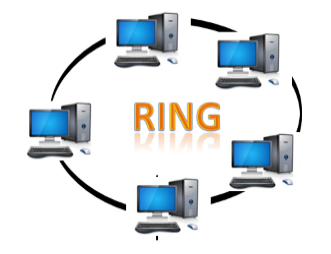
    Ring topology is like a bus topology, but with connected ends.
    The node that receives the message from the previous computer will retransmit to the next node.
    The data flows in one direction, i.e., it is unidirectional.
    The data flows in a single loop continuously known as an endless loop.
    The data in a ring topology flow in a clockwise direction.
    Ring Topology Image
    Star Topology
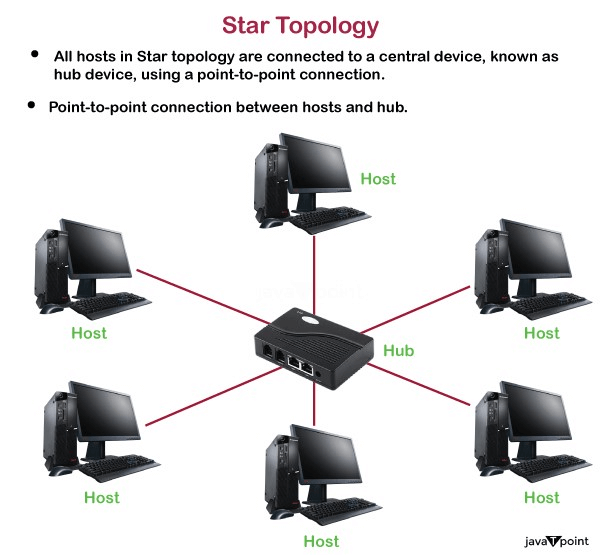
    Star topology is an arrangement of the network in which every node is connected to the central hub, switch or a central computer.
    The central computer is known as a server, and the peripheral devices attached to the server are known as clients.
    Hubs or Switches are mainly used as connection devices in a physical star topology.
    Star topology is the most popular topology in network implementation.
    Star Topology Image
    Tree Topology
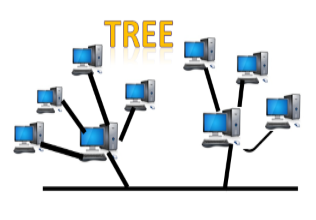
    Tree topology combines the characteristics of bus topology and star topology.
    A tree topology is a type of structure in which all the computers are connected with each other in hierarchical fashion.
    The top-most node in tree topology is known as a root node, and all other nodes are the descendants of the root node.
    There is only one path exists between two nodes for the data transmission. Thus, it forms a parent-child hierarchy.
    Tree Topology
    Mesh Topology
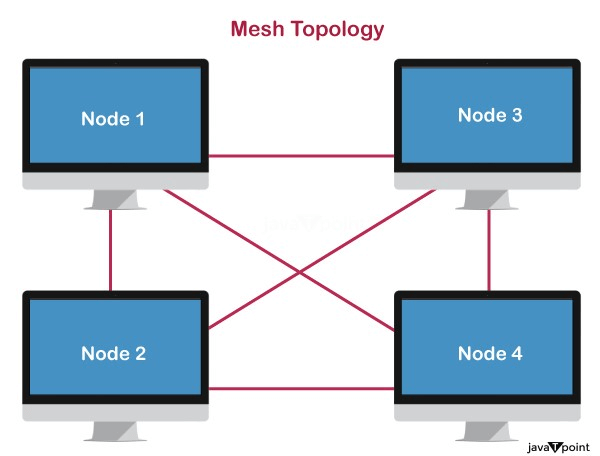
    Mesh technology is an arrangement of the network in which computers are interconnected with each other through various redundant connections.
    There are multiple paths from one computer to another computer.
    It does not contain the switch, hub or any central computer which acts as a central point of communication.
    The Internet is an example of the mesh topology.
    Mesh Topology
    Further types of mesh Topology:
    Full Mesh Topology:
    In a full mesh topology, each computer is connected to all the computers available in the network.
    Partial Mesh Topology:
    In a partial mesh topology, not all but certain computers are connected to those computers with which they communicate frequently.
    Hybrid Topology
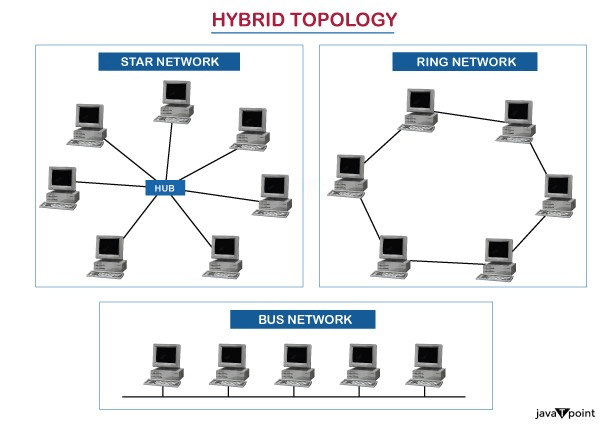
    The combination of various different topologies is known as Hybrid topology.
    A Hybrid topology is a connection between different links and nodes to transfer the data.
    When two or more different topologies are combined together is termed as Hybrid topology and if similar topologies are connected with each other will not result in Hybrid topology.
    Hybrid Topology

  • Write about Sliding window algorithm and explain it in detail?
    The sliding window protocol is a method designed in the network model that allows data exchange more efficiently and within the scope of clearly defined steps in the channel.
    Working of the Sliding Window Protocol
    The working of the sliding window protocol can be divided into two steps sender steps, and the receiver steps and also some important values are needed in a network model for smooth transmission of the data frames are:
    Sender and the receiver side
    Window Size
    The total data frames to be transmitted
    Proper sequencing of the frames
    Steps for the Sender Side
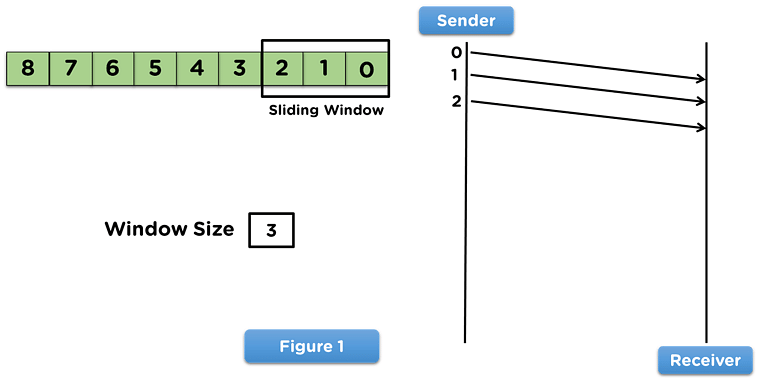
    To begin with, the sender side will share data frames with the receiver side per the window size assigned to the model.
    The sliding window will appear on the frames transmitted over to the receiver side.
    Then the sender will wait for an acknowledgment from the receiver side for the shared frames, as mentioned in this Image
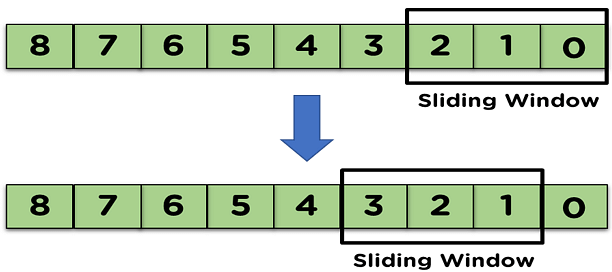
    When the receiver transmits the acknowledgment of the first transmitted frame, the sliding window will shift from the acknowledged frame.
    Example Image
    Now, let's move on to the steps involved on the receiver side.
    Steps for the Receiver Side
    On receiving the data frames from the sender side, the receiver will use the frames in the network model.
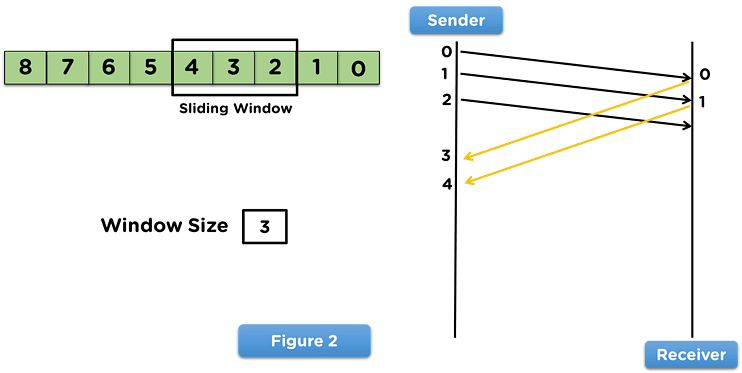
    After the receiver uses the frame, it will transmit the acknowledgement to the sender side for that data frame.
    Then, the receiver side will receive the next data frame from the sender side, as mentioned in this Image
    This process continues until all the frames are transmitted from the sender side to the receiver side, and the receiver side transmits the acknowledgment of all the received frames.

  • What is CheckSum?
    Checksum is the error detection method used by upper layer protocols and is considered to be more reliable than LRC, VRC and CRC. This method makes the use of Checksum Generator on Sender side and Checksum Checker on Receiver side.
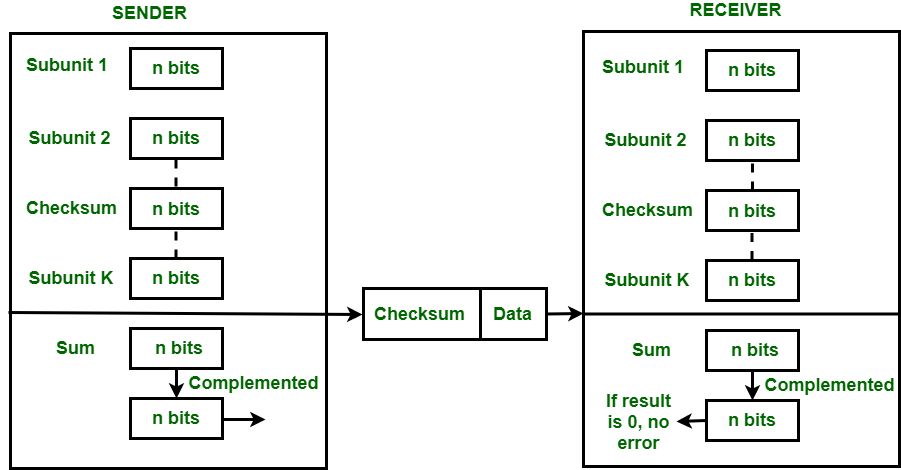
    At the Sender side, the data is divided into equal subunits of n bit length by the checksum generator. This bit is generally of 16-bit length. These subunits are then added together using one’s complement method. This sum is of n bits.
    The resultant bit is then complemented. This complemented sum which is called checksum is appended to the end of original data unit and is then transmitted to Receiver.
    Check sum implementation image
    The Receiver after receiving data + checksum passes it to checksum checker. Checksum checker divides this data unit into various subunits of equal length and adds all these subunits. These subunits also contain checksum as one of the subunits. The resultant bit is then complemented.
    If the complemented result is zero, it means the data is error-free. If the result is non-zero it means the data contains an error and Receiver rejects it.
    Example
    If the data unit to be transmitted is 1010100100111001, the following procedure is used at Sender site and Receiver site.
    Sender Site :
    10101001 subunit 1
    00111001 subunit 2
    11100010 sum (using 1s complement)
    00011101 checksum (complement of sum)
    Receiver Site
    10101001 subunit 1
    00111001 subunit 2
    00011101 checksum
    11111111 sum
    00000000 sum's complement
    Result is zero, it means no error.

  • What is CRC?
    CRC or Cyclic Redundancy Check is a method of detecting accidental changes/errors in the communication channel.
    CRC uses Generator Polynomial which is available on both sender and receiver side. An example generator polynomial is of the form like x3 + x + 1. This generator polynomial represents key 1011. Another example is x2 + 1 that represents key 101.
    Sender Side
    1.The binary data is first augmented by adding k-1 zeros in the end of the data
    2.Use modulo-2 binary division to divide binary data by the key and store remainder of division.
    3.Append the remainder at the end of the data to form the encoded data and send the same
    Receiver Side Perform modulo-2 division again and if the remainder is 0, then there are no errors.
    Example:
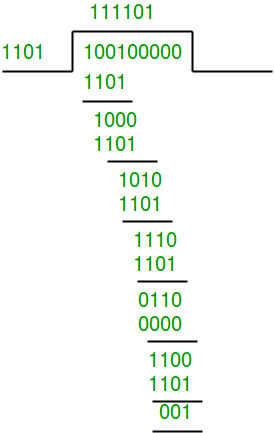
    Data word to be sent - 100100
    Key - 1101 [ Or generator polynomial x3 + x2 + 1]
    Sender Side
    Therefore, the remainder is 001 and hence the encoded
    Data sent is 100100001.
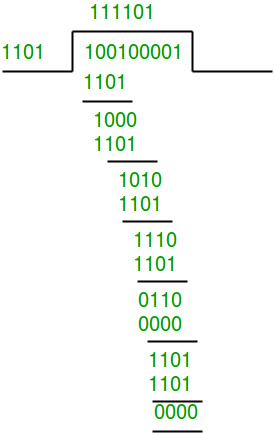
    Receiver Side:
    Code word received at the receiver side 100100001
    Receiver Side
    Therefore, the remainder is all zeros. Hence, the data received has no error.

  • Define SMTP?
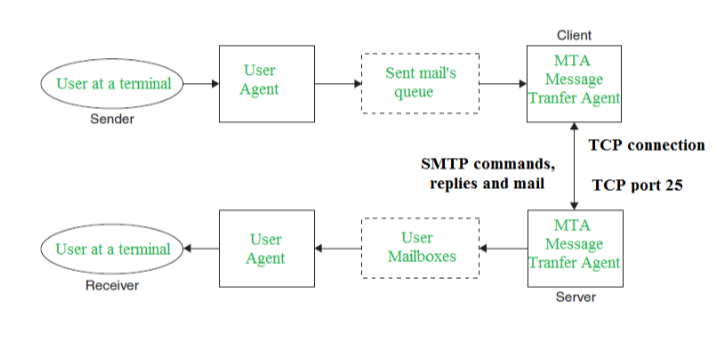
    SMTP stands for Simple Mail Transfer Protocol.
    SMTP is a set of communication guidelines that allow software to transmit an electronic mail over the internet is called Simple Mail Transfer Protocol.
    It is a program used for sending messages to other computer users based on e-mail addresses.
    It provides a mail exchange between users on the same or different computers, and it also supports:
    It can send a single message to one or more recipients.
    Sending message can include text, voice, video or graphics.
    It can also send the messages on networks outside the internet.
    Components of SMTP:
    Components
    Mail User Agent (MUA)
    Mail Submission Agent (MSA)
    Mail Transfer Agent (MTA)
    Mail Delivery Agent (MDA)
    1. Mail User Agent (MUA):
    It is a computer application that helps you in sending and retrieving mail. It is responsible for creating email messages for transfer to the mail transfer agent(MTA).
    2. Mail Submission Agent (MSA):
    It is a computer program that basically receives mail from a Mail User Agent(MUA) and interacts with the Mail Transfer Agent(MTA) for the transfer of the mail.
    3. Mail Transfer Agent(MTA):
    It is basically software that has the work to transfer mail from one system to another with the help of SMTP.
    4. Mail Delivery Agent(MDA):
    A mail Delivery agent or Local Delivery Agent is basically a system that helps in the delivery of mail to the local system.

  • What is difference between Persistent and non-persistent HTTP?
    The Hypertext Transfer Protocol (HTTP) is an application-level protocol that uses TCP as an underlying transport and typically runs on port 80. HTTP is a stateless protocol i.e. server maintains no information about past client requests.
    HTTP Connections
    Non-Persistent
    Persistent

    Persistent HTTP Non-Persi stent HTTP
    The server leaves the connection open after sending a response. Requires 2 RTTs per object.
    Subsequent HTTP messages between the same client/server are sent over an open connection. OS overhead for each TCP connection
    The client sends requests as soon as it encounters a referenced object. Browsers often open parallel TCP connections to fetch referenced objects.
    As little as one RTT for all the referenced objects. Here, at most one object can be sent over one TCP Connection.

  • Explain The concept of FTP and TFTP?
    FTP stands for File Transfer Protocol. This type of protocol is used to transfer or copies the file from one host to another host. But there may be some problems like different file name and different file directory while sending and receiving file in different hosts or systems. And in FTP, secure channel is not provided to transfer the files between the hosts or systems. FTP works on two ports: 20 and 21 One for data and another is for connection control.
    TFTP stands for Trivial File Transfer Protocol. TFTP is used to transfer a file either from client to server or from server to client without the need of FTP feature. Software of TFTP is smaller than FTP. TFTP works on 69 Port number and its service is provided by UDP.